
 viper
viper
# viper
使用viper读取yml文件内容
go get -u github.com/spf13/viper
1
想看目录结构
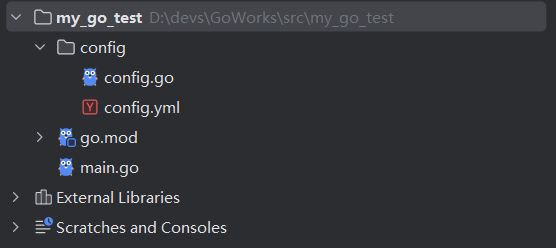
config.yml
app:
  name: zsan
  port: :3000

database:
  dsn: root:111111@tcp(127.0.0.1:3306)/zdb?charset=utf8mb4&parseTime=True&loc=Local
  SetMaxIdleConns: 10
  SetMaxOpenConns: 100
1
2
3
4
5
6
7
8
2
3
4
5
6
7
8
config.go
package config

import (
	"fmt"
	"github.com/spf13/viper"
	"log"
)

type Config struct {
	App struct {
		Name string
		Port string
	}

	Database struct {
		Dsn             string
		SetMaxIdleConns int
		SetMaxOpenConns int
	}
}

var MyConfig *Config

func InitConfig() {
	viper.SetConfigName("config")
	viper.SetConfigType("yml")
	viper.AddConfigPath("./config")
	err := viper.ReadInConfig()
	if err != nil {
		log.Fatalf("Fail read config file: %s \n", err)
	}
	MyConfig = &Config{}
	err = viper.Unmarshal(MyConfig)
	if err != nil {
		log.Fatalf("Fail unmarshal config file: %s \n", err)
	}

}
1
2
3
4
5
6
7
8
9
10
11
12
13
14
15
16
17
18
19
20
21
22
23
24
25
26
27
28
29
30
31
32
33
34
35
36
37
38
39
2
3
4
5
6
7
8
9
10
11
12
13
14
15
16
17
18
19
20
21
22
23
24
25
26
27
28
29
30
31
32
33
34
35
36
37
38
39
main.go
package main

import (
	"fmt"
	"my_go_test/config"
)

func main() {
	config.InitConfig()
	fmt.Println(config.MyConfig.App.Name)
}
1
2
3
4
5
6
7
8
9
10
11
12
2
3
4
5
6
7
8
9
10
11
12
上次更新: 2025/12/20, 17:33:49